
Gameplay
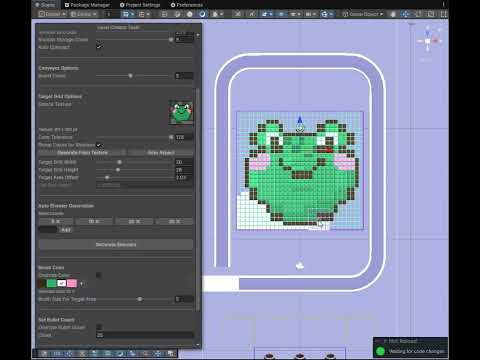
Level Editor
A mobile puzzle game built in Unity featuring custom editor tooling, spline-based conveyor systems, and a fully automated level generation pipeline
Players tap color-matched shooters to send them onto a looping conveyor belt. Each shooter automatically fires at same-color pixel targets arranged inside the conveyor's bounds. Targets shield the ones behind them, so clearing order matters — outer targets must go first.
A fully custom Unity editor that runs inside the Scene View. A floating, draggable, resizable tool window provides all design controls. Designers can paint shooters and targets directly onto the 3D grid with the mouse, set brush size, switch between Paint and Remove modes with keyboard shortcuts, and link shooter pairs by right-clicking.
Auto Shooter Generation reads the target grid layer by layer (outside-in), counts targets per color per layer, and decomposes those counts into shooters using a configurable set of bullet-count denominations (e.g. 5, 10, 20) with carry-forward between layers. This guarantees the generated shooters exactly cover every target in the correct order. Shooters are distributed round-robin across lanes.
Every frame, each shooter on the conveyor is checked against the target grid. The system first determines which side of the grid the shooter is approaching (Bottom, Top, Left, or Right) based on its world position relative to the grid's bounds.
If the conveyor speed is high enough that the shooter moves more than one cell per frame, the scan is interpolated between the last known position and the current one so no column is ever skipped.
ShooterColorId matches the shooter's color are fired upon.A spline (Dreamteck Splines) defines the conveyor track. ConveyorFollowerBoard objects are queued inside a dispenser machine and dispatched one at a time when a shooter jumps.
SplineFollower, then resets and re-queues for reuse — creating a seamless infinite loop with a fixed pool of board objects.Shooters queue in vertical lanes behind each other. Only the front shooter in a lane is eligible to jump. When it leaves, the remaining shooters slide forward and the new front is revealed.
Two shooters can be paired. A LinkObject stretches between them each frame as a visual rope. When the pair is tapped, the front one jumps first, and the second follows automatically after a short delay.
Bullets are managed with Unity's ObjectPool<Bullet>. On fire, a bullet is positioned at the shooter's muzzle and sent toward the target via a speed-based DOTween.
Shooters that complete the conveyor loop with bullets remaining are placed into storage slots rather than being discarded. From storage they can be re-dispatched by tapping again.
All level configuration lives in a LevelData ScriptableObject: a color palette, a flat list of target coordinates with color IDs, per-lane shooter lists with bullet counts and link references, grid dimensions, storage count, and conveyor board count.
ShooterColorId, letting targets keep visual variety while shooters treat them as one group.A generic, type-safe publish-subscribe system. Events are structs (zero heap allocation). The bus pre-warms at startup by scanning all loaded assemblies for IEvent implementations, making runtime dispatch allocation-free.
OnDestroy — clean, decoupled communication with no garbage generation.An abstract PanelBase class wraps CanvasGroup visibility behind ShowPanel / HidePanel with virtual lifecycle hooks.
UIManager listens to gameplay state changes via the Event Bus and switches between the Gameplay, Level Completed, and Level Failed panels automatically.A generic Singleton<T> base for MonoBehaviour managers handles instance creation and duplicate destruction.
GameConfigs and ShooterVisualsConfigs use a separate static-field pattern initialized explicitly at startup, with an AssetDatabase fallback for editor-time access outside Play mode.All animations use DOTween with consistent conventions: related tweens are grouped into a single Sequence to share one lifecycle, every tween is bound to its owning GameObject via SetLink for automatic cleanup, and existing tweens are always killed before new ones are created to handle rapid input safely.
A shared GameGrid struct represents both the shooter grid and the target grid. GridHelper converts between world positions and (column, row) coordinates in both directions.
A runtime configuration system built on Firebase Remote Config that lets game parameters be updated server-side without a new build. On startup, RemoteConfigManager checks Firebase availability, sets the current GameConfigs values as defaults, then fetches and activates remote values — all before the first level is prepared.
GameConfigs via C# reflection and checks whether Firebase has a matching key set with a RemoteValue source. Matching fields are cast to the correct type (float, int, bool, string) and written automatically — no manual mapping needed. New config fields are picked up without any additional code.GameConfigs.CreateRuntimeCopy() instantiates an in-memory copy of the ScriptableObject and redirects the static Instance pointer to it. All subsequent reads and writes go to the copy, so the original asset on disk is never modified during play._useLocalConfig inspector toggle skips Firebase entirely and uses local values as-is — useful for offline development. If Firebase is unavailable or the fetch fails for any reason, the game continues with the local defaults. The level preparation callback is always invoked regardless of the fetch result.Initialize() called ChangeGameplayState(Gameplay) which fired an event that triggered PrepareForLevel(), and then Start() called PrepareForLevel() a second time. The new flow defers PrepareForLevel() entirely to the Remote Config ready callback, and the state-change handler only re-prepares on Win→Gameplay or Fail→Gameplay transitions.While developing the Level Creator Editor, I used Claude Code as an AI coding assistant throughout the process. The editor's complexity — custom Scene View GUI, drag-based painting, image resampling, auto shooter generation, and live validation — made it a great candidate for AI-assisted development.
Claude Code helped me iterate faster on the editor's architecture, debug edge cases in the coordinate system, and refine the auto-generation algorithm. It was particularly useful for writing and restructuring the custom Unity Editor GUI code, where the API surface is large and documentation-heavy. The core design decisions and game systems were mine, but having an AI assistant significantly accelerated the implementation of the tooling side.